Fast capture
QR & barcode scanning
Point, detect, and decode with live camera scanning or a selected image. Use the torch when the light is less than ideal.
Scan QR codes and barcodes, digitize documents, create PDFs, recognize text, and keep everyday tasks organized in one focused Android utility.
One app. More useful moments.
Each feature has a clear purpose — from catching a code in seconds to turning paper into a PDF you can keep.
Fast capture
Point, detect, and decode with live camera scanning or a selected image. Use the torch when the light is less than ideal.
Capture document pages, create PDF files, and open saved scans for viewing and further work.
Recognize text in captured or imported images and keep the result available for your next action.
Browse, search, save, and manage local scan records so useful results are easy to find again.
When selected as your Home app, the launcher experience keeps scanning tools within a quick swipe.
Interactive preview
This browser demo is a visual simulation only. It does not access your camera, files, or clipboard.
Align a QR code inside the frame
Inside the experience
Use the controls or swipe the preview to explore real product screens supplied for the app.
ALL-IN-ONE HOME
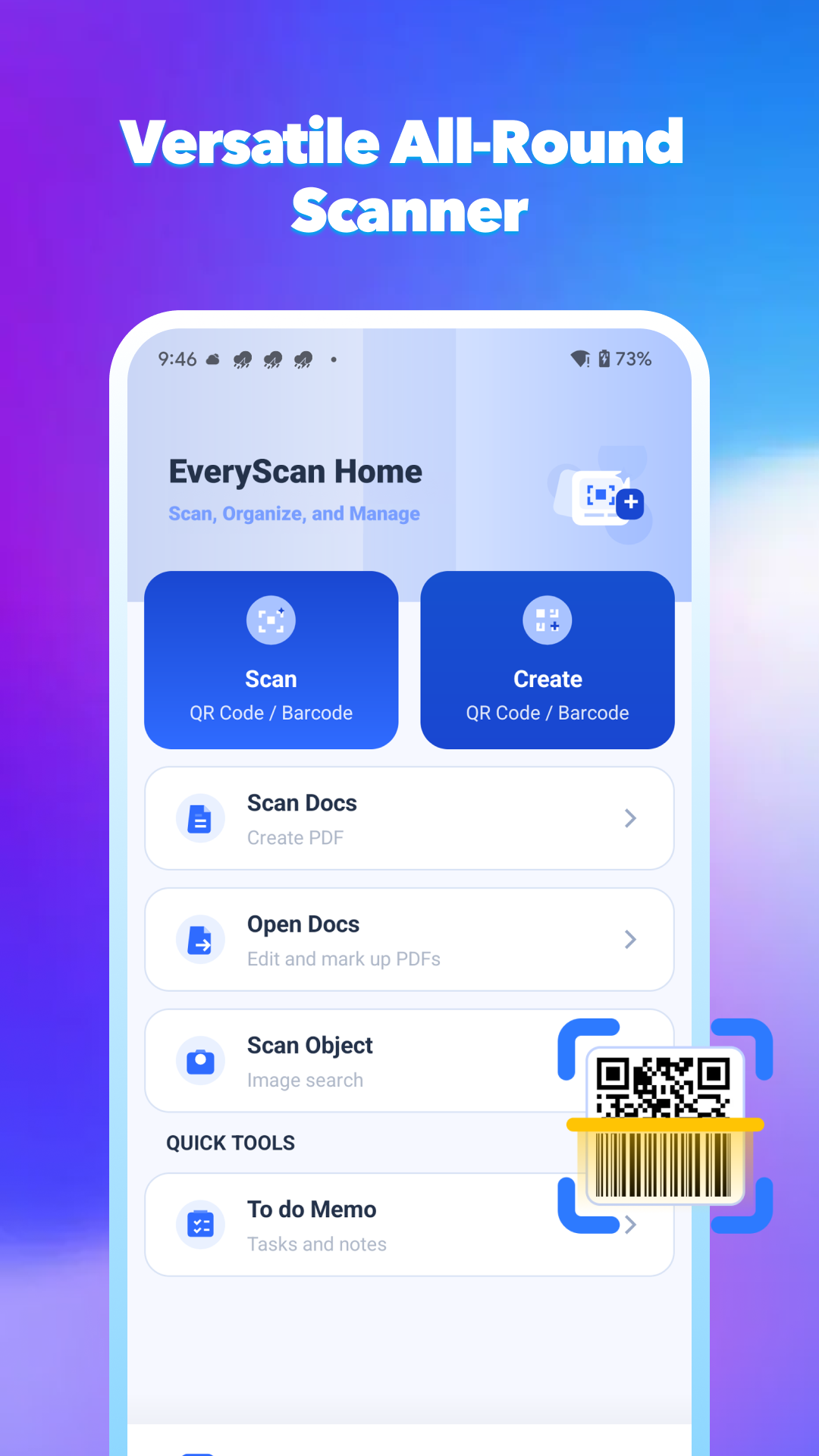
Scan or create a code, digitize a document, open PDFs, recognize an object, or add a memo from one clear dashboard.
Clear by design
Core barcode, QR, OCR, document, and PDF processing is performed locally. The app does not upload your live camera feed, private documents, scan results, recognized text, or generated PDFs to our servers.
Limited technical information may be processed by integrated services for analytics, diagnostics, attribution, advertising, security, and related operations, as explained in the Privacy Policy.
Read the complete Privacy PolicySimple from the first tap
Open the scanner, code creator, document tool, or another utility from the home screen.
Use the camera for a live scan or choose an image when the feature supports importing.
View, save, copy, export, share, or return to a locally stored record when you need it.
Questions, answered
EveryScan Home is currently preparing for release. No store download link is shown until the listing is available.
@ Contactinfo@umitaka.co.jpYes. The core barcode, QR code, OCR, document scanning, and PDF generation functions can operate offline. Network access may still be used for services described in the Privacy Policy.
Scan history, recognition results, app settings, and documents stored in the app’s private storage remain on your device until you delete them, clear app data, or uninstall the app. Exported files are managed separately through your device.
No account-based cloud backup or synchronization is provided for scan history, recognized results, generated PDFs, or other locally stored app data.
The home screen experience applies when you choose EveryScan Home as your default Home app. You can select another Home app or launcher later through Android settings or the in-app help path described in the Privacy Policy.
EveryScan Home
The product is being prepared for release. Visit again when the official store listing is available.